
Have you heard of this rule of thumb? Probably yes, but for every rule, we should know why it is in place and also when to break the rule. And this is a rule that I most often break for my installations as my amount of SSIDs is typically 6.
So, where does this rule come from?
The Problem
Airtime is our most precious currency in Wi-Fi. The more SSIDs we have, the more overhead is caused by sending beacons. Yes, MBSSID could help, but it is quite uncommon outside of the 6GHz band.
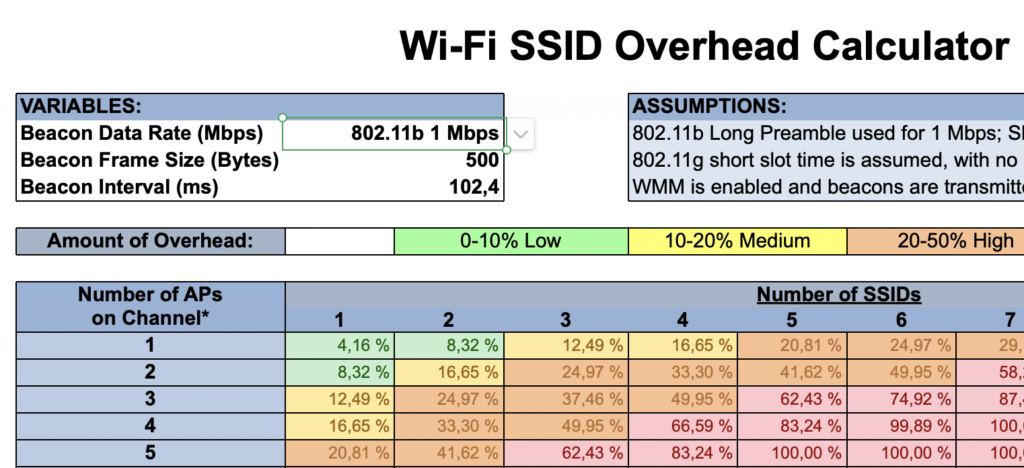
Let’s do a calculation with the legendary Wi-Fi SSID Overhead Calculator from RevolutionWifi:
https://revolutionwifi.blogspot.com/p/ssid-overhead-calculator.html
I just stated that I typically have 6 SSIDs, so let’s calculate the overhead for this amount of SSIDs. I assume a beacon size of 500 bytes and three APs on the same channel.
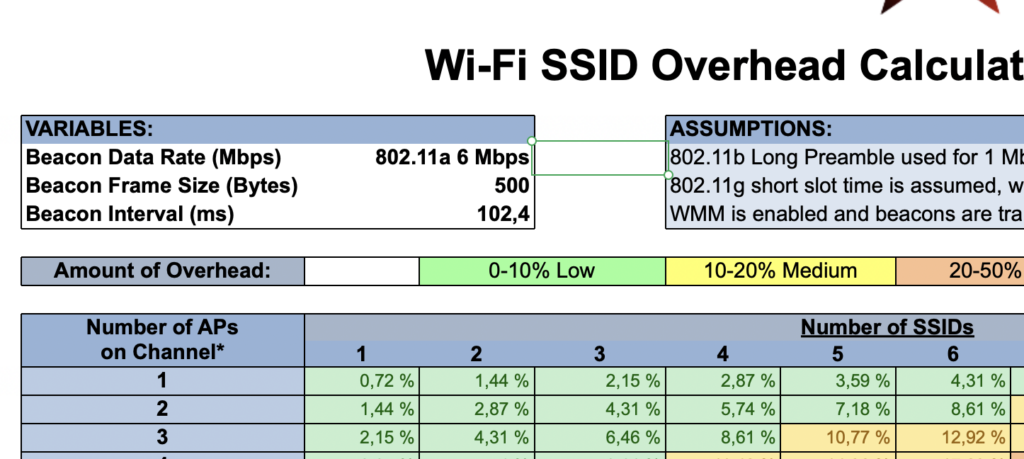
In this setup, the airtime that is used by the beacons is 12,92%. With 3 SSIDs we have an overhead of 6,46%.
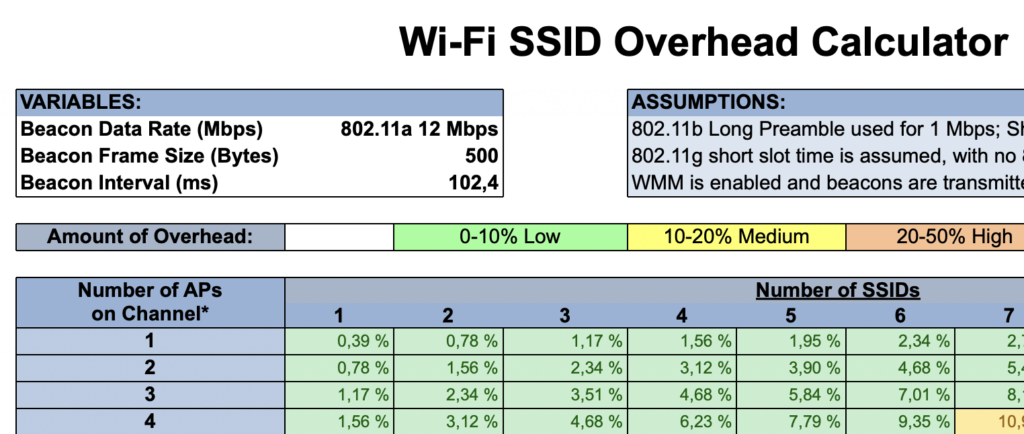
But wait, 6 MBit Minimum Basic Rate? Hopefully not. We typically use at least 12 MBit which reduces the overhead to 7.01% with 6 SSIDs:
And quite often I also use 24 MBit/s and we are down to 4,06% which really shouldn’t hurt us that much in a non-HD scenario:
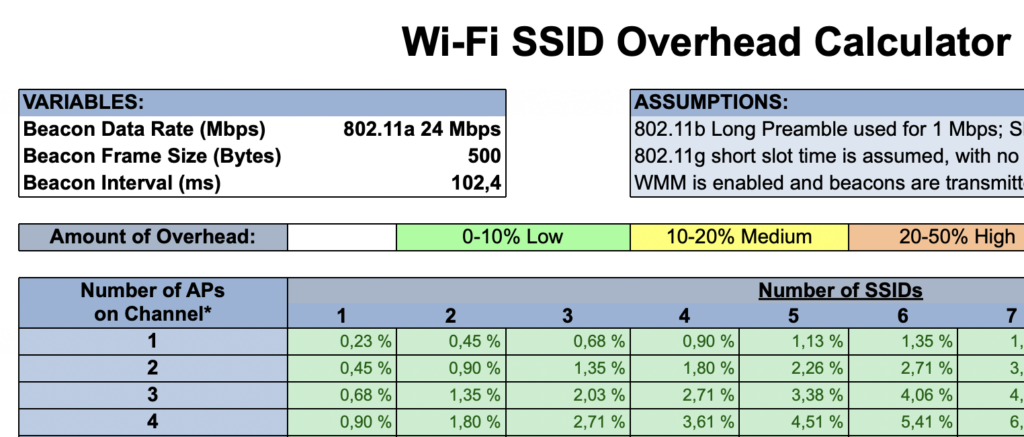
If I can increase the security and functionality with these additional SSIDs, I am happy to waste this 3.5% of additional airtime (12MBit MBR).
The above calculation was based on 802.11a. But if we still had a Minimum Basic Rate of 1 MBit/s on our 2.4GHz band, our airtime consumption would already be 74,92% with 3 APs on a channel and 6 SSIDs. With only 3 SSIDs we were down to 37.46%. So, again: We have to tune the Basic Rates!
The need for multiple SSIDs / My Setup
When do we need separate SSIDs?
Every time we need different authentication schemes that implement completely different security, we should separate these with different SSIDs. We need separate SSIDs for our Corporate SSID with 802.1X and for an SSID with a passphrase.
Do we really need two SSIDs in this case? No, this is what IEEE 802.11-2024 defines under 9.4.2.23.3 „AKM suites“:
NOTE 5—AKMs 00-0F-AC:1 can simultaneously be enabled with AKM 00-0F-AC:8 or 00-0F-AC:24 or both by an Authenticator.
NOTE 6—AKMs 00-0F-AC:1 and 00-0F-AC:2 can simultaneously be enabled by an Authenticator.
Luckily, AKM 1 is nothing we want to use nowadays anyway. And I didn’t find anything similar for AKM 5 in the standard.
Should we use that? No! Too many clients would get confused with this, what our Wi-Fi friend Renzo Notter found out and described in his blog.
Do we need more than one? At least not for applying Authorization. Each client on this SSID can be sent to the corresponding VLAN or have the correct QoS policy applied from the AAA-server.
We definitely need one SSID for the Corporate WLAN that we can use with WPA3-Enterprise.
This is the first SSID in my setup and it get’s enabled on 5 and 6 GHz.
And we likely need one or two SSIDs for devices that don’t support 802.1X and have to use a passphrase based authentication.
First we have all the IoT stuff. More modern devices likely support WPA3-Personal. But some legacy devices might only support WPA2-Personal.
Next assumption: Friends don’t let friends use transition mode.
And as I said in my presentation at last year’s WiFiDesignDayDACH, there is only one thing that is worse than Transition mode; and that is the Compatibility mode.
In this case, I typically configure two SSIDs. One for WPA2-Personal and one for WPA3-Personal. If possible, I use both with an IdentityPSK approach. I keep the legacy SSID on the 2.4 band, but sometimes also enable 5 GHz for the more modern devices.
With that, we are up to 2 SSIDs in 2,4 GHz, 2 SSIDs in 5GHz and 1 SSID in 6 GHz.
And now the guests:
We never know what devices our guests bring. Today, I wouldn’t expect guests with 2.4GHz only devices. But why not keep this band available for guests as well?
So, how could our SSID setup look? In this post, I only look at „open“ guest SSIDs.
If the customer wants to have Guest access on all three bands, we need two SSIDs. Did I mention that I don’t like transition mode? For this, my approach is typically to have a „GuestsFast“ SSID on 5 (and optionally 6 GHz) with OWE enabled. And another SSID „Guests“ with open authentication (if permitted by the customer) on 2.4 (and, depending on the situation, also on 5 GHz).
A guest user will always try to connect to the „GuestsFast“ SSID. If the client can do OWE, everything is fine. But if the connection fails, the user will go directly to „Guests“ and have a successful connection.
Now we are up to 3 SSIDs in 2.4 GHz, 4 SSIDs in 5 GHz and 2 SSIDs in 6 GHz.
One SSID is still missing: What should be done with the employee’s personal devices? We want them connected to the WLAN so they don’t continually probe for their home networks. Where possible, I add them to the 5 GHz IoT network with a different passphrase or give them a reservation on the guest network. If neither is feasible (also when IdentityPSK is not possible) in the environment, I add one more 5GHz SSID for this.
With how many SSIDs did we end? We have up to 6 SSIDs in total. But we also need to look at it per band:
- 2.4 GHz: 3 SSIDs (2*for IoT, 1* for Guests)
- 5 GHz: typically 3 to 5 SSIDs (1*Corp, 1 or 2*IoT, 1 or 2 for Guests and sometimes Employee)
- 6 GHz: 1 or 2 SSIDs (1*Corp, 1* Guests)
Although there are 6 SSIDs in total, no single band has typically more than 5, and with the best practice of a minimum bitrate of 12 MBit/s, the airtime consumption overhead is still pretty low.
Is this approach the only truth? Certainly not! But it’s an approach I like and which worked for me multiple times.
What is your SSID setup?
This blog-post is the combination of my two “50 Days of LinkedIn” posts #18 and #19